
Job Costing Software for Metal Fabrication Shops
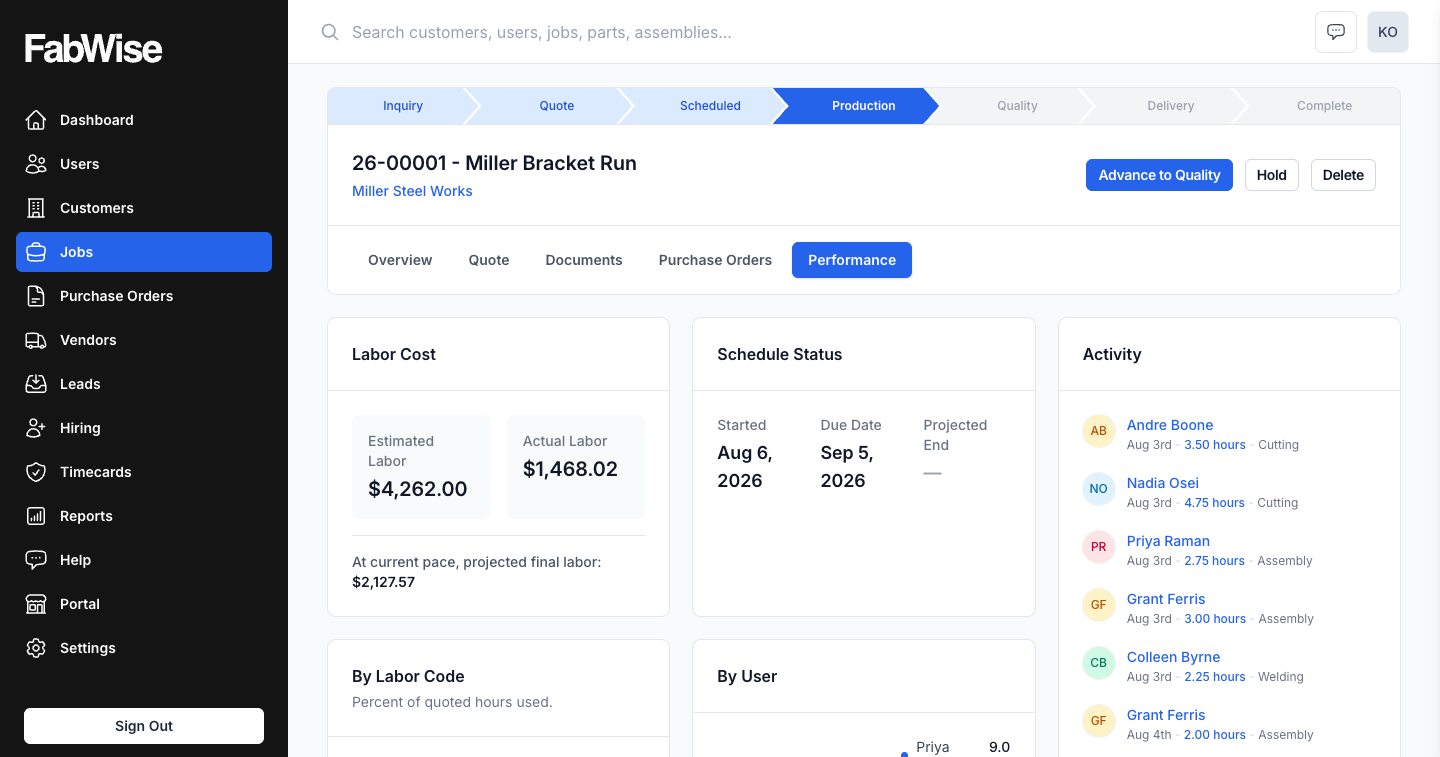
FabWise gives fabrication shops real-time labor cost visibility per job. Workers attribute their hours at the workstation — tapping a job as they start it, or allocating the day's hours before they leave; either way the totals accumulate automatically. Before a job closes, you see hours-to-budget. After it closes, you have a complete labor cost record. No spreadsheet reconciliation, no end-of-week guesswork — the cost picture is current because the time capture is current.
The Job Costing Problem in Fabrication Shops
Job costing in fabrication shops fails at the data collection step, not the math step. The math is simple: hours worked × burdened labor rate = labor cost. The problem is getting accurate hours per job without requiring someone to manually reconstruct them.
In a shop running paper time cards or generic spreadsheets, the reconstruction happens every week: someone reviews time cards, estimates which hours went to which job, and enters them into a job cost sheet. The estimates are wrong. Jobs that looked profitable on paper close at a loss. Quotes for future similar jobs start from corrupted data.
FabWise eliminates the reconstruction step. Labor hours per job are captured at the source — at the machine, by the worker, against the specific job and task. Nothing to reconstruct.
The National Association of Manufacturers consistently identifies job cost accuracy as a top operational challenge for small and mid-sized fabricators. Shops that win on margin typically have one thing in common: they know what jobs actually cost.
How FabWise Tracks Labor Per Job
A shift records who worked and when; a task records what that time went to. Workers attribute their own time at Workstation — the individual screen at the machine, part of the Professional package — in one of two ways:
Tapped as it happens. The operator taps the job and task they're starting; the clock runs against it until they tap something else. Recorded at the moment the work changes, so it doesn't depend on anyone's memory.
Allocated before they leave. The worker sees the hours their shift captured and assigns them across the jobs they worked, then confirms the day. For shops where operators move too often to tap every change, this gets honest attribution without pretending otherwise.
Jobs are your customer projects or production runs — whatever unit you use to track work for billing or costing purposes. FabWise doesn't replace your ERP or job management system; it captures time against the job identifiers you define.
Tasks are the sub-categories within a job: welding, fitting, finishing, inspection, rework. Task-level tracking gives you the breakdown you need for quoting future work accurately — not just "it took 40 hours" but "it took 12 hours of welding, 8 hours of fitting, 20 hours of finishing."
Moving between jobs doesn't mean clocking out and back in — the shift keeps running while the attribution underneath it changes. One shift, however many jobs it touched.
Real-Time WIP — See Cost Before the Job Closes
Work-in-progress (WIP) visibility is what separates shops that catch overruns from shops that discover them at invoice time.
FabWise shows hours-to-budget on every active job in real time. If a job is budgeted for 40 hours and you're at 35 hours with two operations left, you know now — not after the job closes and the customer is already holding the invoice.
This is distinct from backward-looking job cost accounting. That tells you what jobs cost after they're closed. WIP visibility tells you what this job is going to cost while you can still make decisions.
FabWise's daily briefing — an intelligent assistant that monitors your jobs — flags jobs running over their hours budget each morning, so an overrun doesn't wait for someone to open the job to notice it.
Hours You Can Trust Before You Cost Them
A cost number is only as good as the hours behind it. FabWise separates capturing a shift from approving it: a supervisor reviews the week's flagged shifts — a late start, a missed break, a forgotten clock-out — and signs off before that week's hours are treated as final. The original clock taps are never overwritten; a correction is its own event, with who made it and why attached. That's what makes an actual-vs-estimate number on an open job something you can act on instead of something you have to double-check first. See time tracking for the full review and sign-off workflow.
From Hours to Cost: Applying Your Burdened Labor Rate
FabWise captures hours. You apply your burdened labor rate in your job cost analysis. Labor burden — payroll taxes, insurance, benefits — typically adds 25–40% on top of base wages. A $25/hr welder actually costs $31–$35/hr fully burdened.
FabWise is deliberately not in the business of storing pay rates or calculating labor cost automatically. Pay rate data is sensitive, varies by worker, and is already in your payroll system. The clean separation is: FabWise owns accurate hours per job; your payroll provider and costing spreadsheet own the rate math.
The export from FabWise gives you hours by worker, by job, by task, by time period. You apply your burdened rates to get labor cost. Add the material and subcontract cost recorded against the job's purchase orders, and that's your job cost.
Quoting Against the Numbers That Actually Happened
Job costing and quoting are the same problem looked at from two directions: a quote is a hypothesis about hours, and the actuals are the check on it. FabWise keeps both in one place instead of splitting the estimate into a spreadsheet and the actuals into a time-tracking tool that never talks to it.
A quote is built from quoted labor lines — hours by labor code, priced at your rate — plus material, subcontract, and freight lines where the job needs them. Those quoted labor hours become the job's budget the moment they're saved; that's the number actual hours are measured against for the rest of the job's life. Quotes export to PDF or CSV, import from CSV for bulk estimating, and issue as a numbered document a customer can accept — in person or through an e-signature page. Revising an estimate after it's issued records an explicit revision rather than silently overwriting the number the customer priced against.
None of that replaces knowing what jobs actually cost. It's the other half of the same discipline Nick built FabWise around: hours worked, plus your shop rate, against what you quoted — is the job under or over. Simple math, but only if the hours feeding it are real. A shop that's tracked ten similar jobs at accurate actual hours quotes the eleventh from a distribution, not a gut call — "welding a 6-foot steel frame" has a known range, not a guess.
For more on the labor cost inputs that feed job costing, see labor tracking and the labor burden glossary entry.
Purchase Orders and Vendor Costs on the Job
Labor isn't the only thing a job absorbs. FabWise tracks purchase orders against a job — vendor, PO number, order and expected-delivery dates — with an optional cost allocation split by category (material, labor, subcontract) so a PO's cost lands on the same job its hours are landing on. Marking a PO received closes the loop from ordered to on-hand without a second trip to a spreadsheet.
This is deliberately scoped: FabWise records what a PO costs a job, not a full purchasing workflow with vendor catalogs, receiving against line items, or inventory levels. It's the piece that keeps material spend visible next to labor spend on the same job, not a replacement for procurement software.
What Breaks Job Costing — and How FabWise Prevents It
The most common job costing failures in fabrication shops:
Mis-tagged hours — A worker taps the wrong job, realizes mid-shift, and either doesn't correct it or asks a supervisor to fix it without an audit trail. FabWise treats a correction as its own event: the original capture is preserved, and the correction carries who made it, when, and why.
Untagged hours — Time gets captured with no job behind it and lands in a "general" bucket nobody ever cleans up. FabWise makes the gap visible instead of silent: task coverage is a tracked metric, so unattributed hours show up as a number on the dashboard rather than quietly diluting every job's cost.
Retroactive reconstruction — A manager reviews the week's time cards on Friday and tries to remember which jobs ran on which days. That produces estimates, not data. FabWise attributes at the machine while the day is still the worker's own — same day at the latest, not the following week by someone who wasn't there.
Silent edits — Admin overwrites a time record to fix an error, destroying the original capture and the audit trail. FabWise separates capture from correction: original records are immutable after landing; corrections attach to the record with the corrector's name, reason, and timestamp.
Integration with Your Existing Systems
FabWise does not replace your ERP, job management software, or accounting system. It adds accurate labor time capture to whatever job management infrastructure you already have.
The practical integration is export-based: FabWise exports labor hours by job by period, which you import into your job costing spreadsheet, ERP, or accounting system. The NIST Manufacturing Extension Partnership documents common integration patterns for small manufacturer data systems — export-based integration is standard for this scale.
For direct payroll integration, see payroll export.
Is FabWise Right for Your Shop's Job Costing?
FabWise is the right fit if:
- You track labor cost by job or production order
- You need hours captured in real time, not reconstructed at week-end
- You have workers who move between jobs during a shift
- You want task-level breakdown within a job (not just total hours)
- You quote jobs and want the actuals measured against what you quoted, automatically
- You're currently losing margin because your quotes don't reflect actual labor cost
FabWise doesn't allocate overhead — rent, equipment, and administrative cost applied across jobs is an accounting function you run in your costing model, not something FabWise calculates for you. And FabWise doesn't calculate pay, classify overtime, or enforce labor law: it captures accurate hours and cost data; your payroll provider handles pay. Inside that boundary, FabWise owns the job costing picture end to end — quote, actual hours, purchase orders, and the variance between what you planned and what happened.